Every few weeks somebody emails us a variant of the same question. "I need to upload my photo to a government portal. It has to be under 200 KB. But every compressor I try either gives me a 340 KB blob or a smeared 40 KB potato. Why is this so hard?"
It's hard because almost every image tool on the internet asks the wrong question. They ask "what quality do you want, from 0 to 100?" But nobody actually knows the answer to that. What people know is: I need this under 200 KB, and I need my face to still look like my face.
BPIE — the Bluebird Perceptual Image Encoder — is our attempt to answer the question people actually have. It's not a new algorithm and it's not a new codec. Target-size solvers on top of SSIM have existed for over a decade — the closest cousin, jpeg-recompress (2014), does almost the same binary search on a desktop command line. What BPIE contributes is a small, honest engineering package: it runs entirely in a browser tab with no upload, it fails gracefully when the target is impossible instead of quietly producing a smeared potato, and it treats the SSIM floor as a hard constraint rather than a suggestion. This post explains how it works, why it works, and — importantly — where the prior art already covers the same ground.
What's actually new here (and what isn't)
Being honest about prior art matters, because the internet has enough tools that overclaim. Here's the split.
Not new: binary search on encoder quality to hit a target file size. jpeg-recompress has done this since 2014. Not new: using SSIM as the perceptual floor instead of trusting a raw quality number — same paper, same idea, same decade. Not new: the observation that quality-vs-size is a non-linear S-curve and human intuition is bad at it. Every serious compression researcher has known this since the 1990s.
What is new, or at least uncommon in a single package: running the whole solver inside a browser tab with no server round-trip; short-circuiting when the source already fits so we don't waste encodes; surfacing an explicit failure ("could not hit 200 KB without dropping below the quality floor") instead of silently overshooting or silently degrading; and packaging it so a portal-photo user, not a codec researcher, is the target audience. If you want the desktop research tool, use jpeg-recompress or Guetzli. If you want a browser button that behaves predictably for the "under 200 KB please" use-case, that's what BPIE is for.
The problem, drawn as a graph
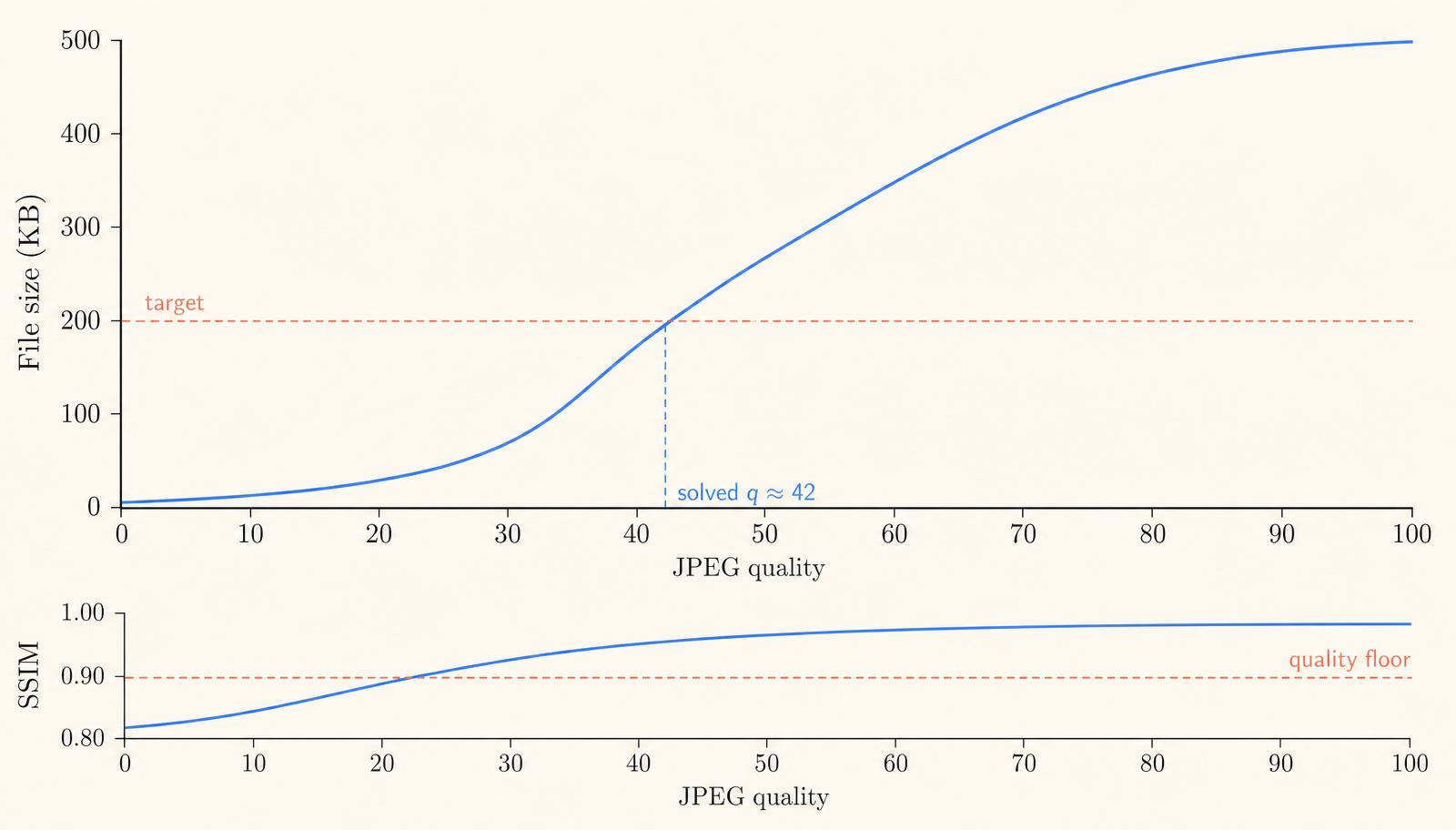
If you take a photo and re-encode it at every JPEG quality from 0 to 100, then plot the file size, you get a curve like the one below. It's not linear. It's not a nice diagonal line. It's an S-curve that's mostly flat in the middle-ish and shoots up sharply at the top.
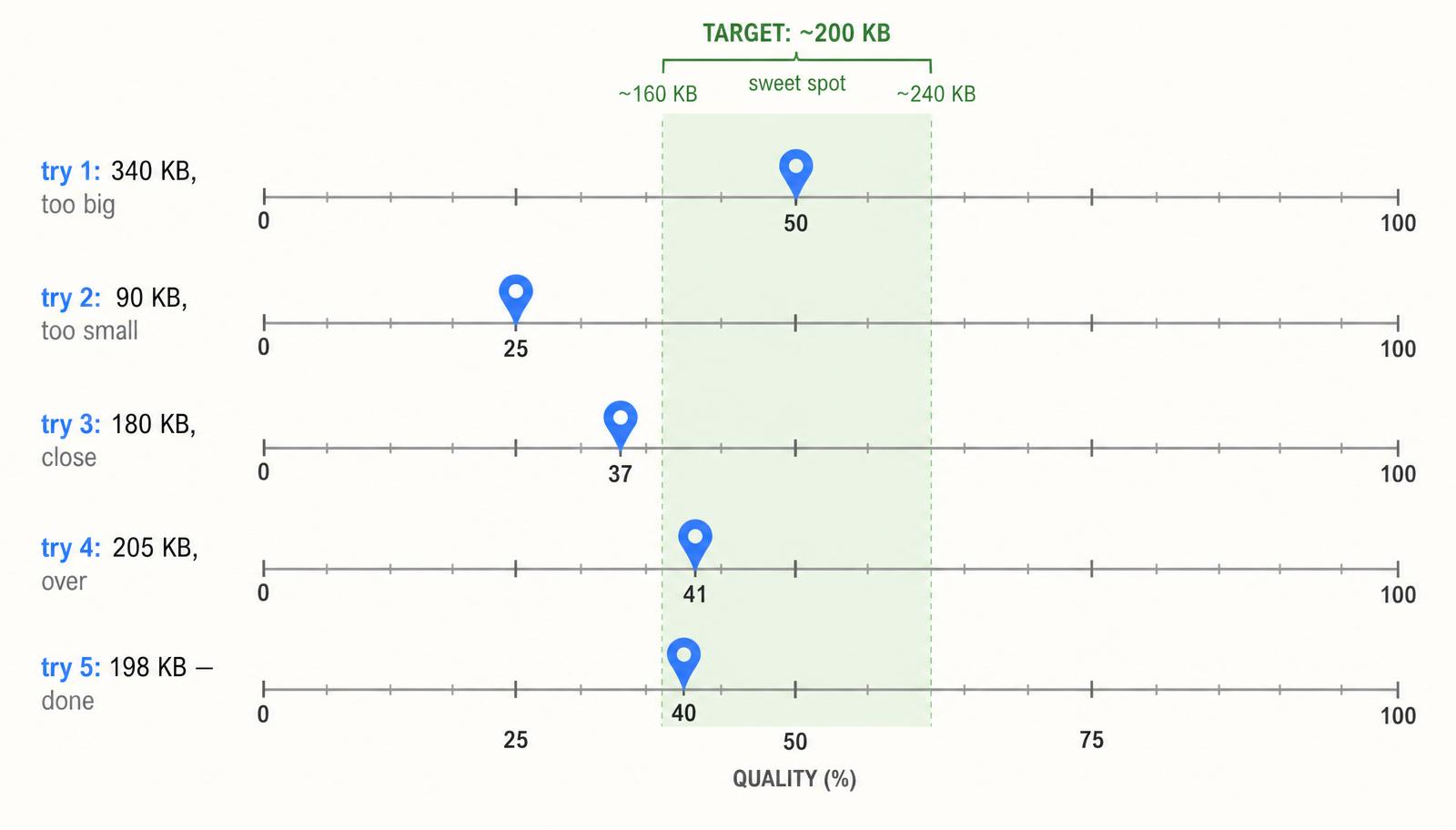
This shape is why the naive approach fails. Somebody says "try quality 50", the file lands at 340 KB, they think "okay, halve it, try 25", and the file crashes down to 90 KB — way under the target and now visibly ugly. The relationship between quality and size is non-linear, and human intuition about non-linear things is bad. This is exactly what algorithms are for.
The core idea: binary search on quality
The curve is monotonic — higher quality always means a bigger file. That single fact unlocks the whole approach, because it means we can use binary search. Binary search is one of the oldest and simplest algorithms in computing. You pick the middle of a range, check whether the answer is above or below, throw away half the range, and repeat.
For BPIE, the range is quality 0 to 100. On each try, we actually re-encode the image at the chosen quality, look at the resulting bytes, and decide: too big → search the lower half; too small → search the upper half. Because we halve the search space every step, we get within one quality point of the answer in about seven tries — that's log₂(100) ≈ 6.6. In practice we usually stop earlier, when the file lands inside a comfortable ±20% band around the target.
Why not just… guess based on the file size?
A tempting shortcut is to estimate: "the current file is 340 KB at quality 50, I want 200 KB, so try quality 50 × (200/340) = 29". Some tools actually do this. It fails badly for two reasons.
First, quality is not proportional to bytes. That S-curve is very much not a straight line, so linear extrapolation is a lie. Second, the encoder itself is content-dependent. A photo of a blue sky and a photo of a forest at the same quality can differ in size by a factor of ten, because JPEG spends more bits where there's more detail. Any guess based on "this ratio" ignores what's actually in the image. Binary search doesn't care what's in the image — it just asks the encoder each time.
The missing piece: a quality floor
Binary search alone will happily give you a 200 KB file at quality 12 if that's what the maths says. And that file will look terrible. So BPIE has a second constraint: never dip below a perceptual quality floor, even if it means slightly overshooting the target size.
The floor uses SSIM — Structural Similarity Index — a metric published in 2004 by Wang, Bovik and colleagues. SSIM compares two images by looking at luminance, contrast, and structural patterns in local windows, rather than pixel-by-pixel differences. That matters because two images can have very different pixel values (say, one is slightly brighter) and still look identical to a human, while two images with tiny per-pixel differences can look wildly different if those differences form a visible artefact.
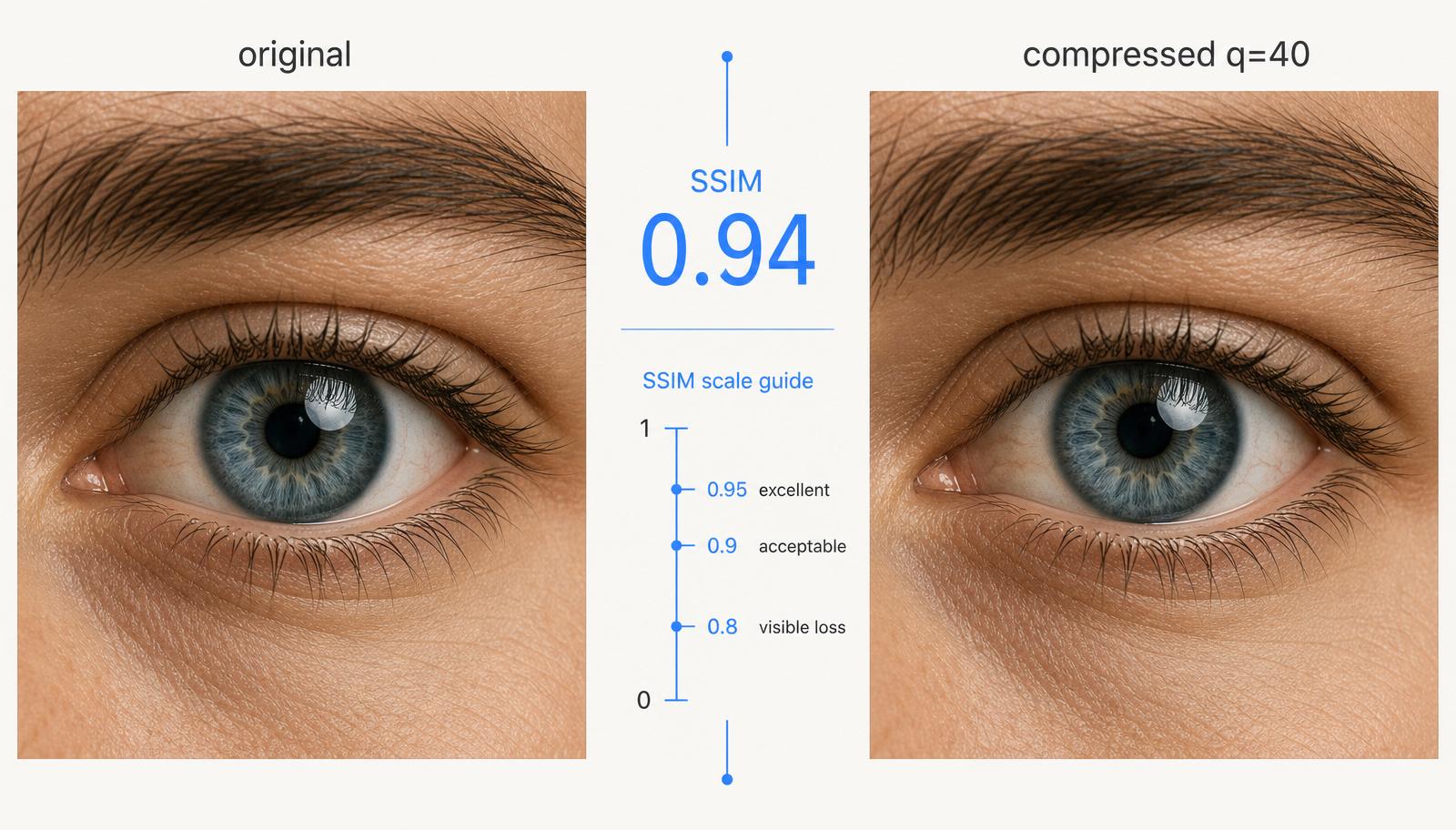
SSIM returns a number from 0 to 1. 1.0 is pixel-identical. Below about 0.9, most people start to notice loss. Below 0.8, everyone does. BPIE's default floor is 0.90, which means: if the highest quality that fits your target size gives SSIM below 0.90, we raise the quality until we clear the floor and warn you that we couldn't fit the target.
Why SSIM and not something simpler
The obvious alternative is mean squared error (MSE) or its pretty cousin, PSNR. Both are trivial to compute: subtract, square, average. Both are also famously bad at predicting what humans see. A paper of MSE-optimised images from 20 years ago will still look worse than a modern SSIM-guided compression at the same file size.
There are also newer metrics: butteraugli, SSIMULACRA, and neural-network-based ones like LPIPS. They're more accurate but more expensive, and — critically for us — they don't yet have small, fast, browser-friendly implementations. SSIM computed on a 512-pixel downscaled reference runs in a few milliseconds in JavaScript. That's the sweet spot: accurate enough to catch bad outputs, cheap enough to run on every iteration inside a browser tab on a mid-range phone.
Two smart short-circuits
The full binary search takes 5–7 encodes. Each encode of a 12-megapixel photo takes 100–300ms in a browser tab. That's fine, but we can do better in the common cases.
First short-circuit: if the image already fits at maximum quality (say your source is a 180 KB WebP and you asked for 200 KB), we're done in one encode. No search needed. This alone catches maybe 20% of real requests.
Second short-circuit: after two data points, we know two (quality, size) pairs. We can fit a rough curve through them and jump directly to the estimated answer for our third guess, instead of bisecting the midpoint. In practice this cuts a typical search from 6 tries to 4 tries. It's not necessary for correctness — binary search would still get there — but it's a free 30% speedup.
What it looks like in practice
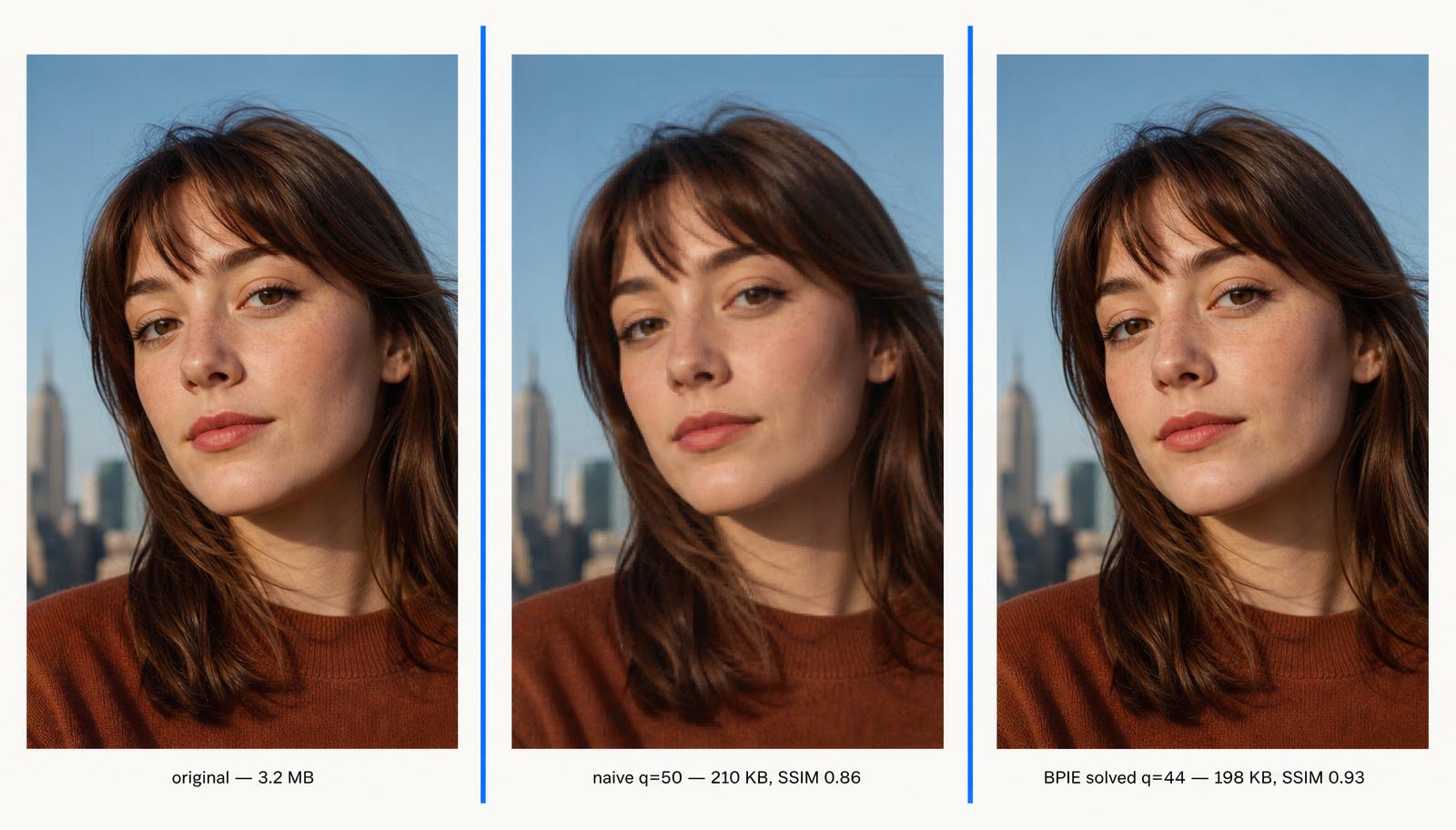
Here's a real portrait, run three ways. The original is a 3.2 MB JPEG straight from a phone. On the left of the comparison below, we set a naive quality of 50 — the classic "just pick something in the middle" approach. It lands close to the target size, but at SSIM 0.86, meaning the skin has visible blockiness and the eyes look plastic. On the right, BPIE has solved for the target 200 KB with an SSIM floor of 0.90. It picks quality 44 (not 50), lands at 198 KB, and scores SSIM 0.93 — a difference you can see immediately in the eyes and skin texture.
Six quality points doesn't sound like a lot. But on human faces — which is where our brains are most sensitive to artefacts — the difference between SSIM 0.86 and 0.93 is the difference between "that looks a bit off" and "I can't tell it was compressed".
The algorithm in twenty lines of pseudocode
Stripped of niceties, the whole thing is short enough to fit on a napkin. Here's the shape of it:
1. If the image at max quality already fits under target, return that. 2. Set low = 0, high = 100. 3. Repeat up to 7 times: a. mid = (low + high) / 2 b. Encode the image at quality = mid; measure bytes and SSIM. c. If bytes > target: high = mid. d. Else if bytes < target × 0.8: low = mid. e. Else: we're in the sweet spot, break. 4. If the best result violates the SSIM floor, walk quality upward until it doesn't. Flag the output as over-target. 5. Return the best-scoring candidate we've seen.
The real code has a few extras — an ImageBitmap lifecycle to avoid memory leaks on 50-megapixel inputs, a downscaled 512px reference canvas so SSIM stays fast on big images, and format detection so it can chain the same solver over JPEG, WebP, or AVIF. But the loop above is the whole algorithm. Everything else is engineering.
Where it breaks (and what we do about it)
BPIE is not magic. There are three failure modes worth naming.
One: impossible targets. If you ask for a 20 KB output from a 24-megapixel photo, no quality setting will get you there without also dropping resolution. BPIE handles this by optionally scaling the image down before searching — you can opt in with a max-dimension setting, and we're working on making that automatic based on the target.
Two: images with hard edges — screenshots, diagrams, text. JPEG genuinely handles these badly at any quality. In those cases BPIE will hit the SSIM floor immediately and refuse to go lower, which is correct behaviour but frustrating. The right tool for screenshots is a lossless PNG optimiser, not a lossy encoder; we'll route you to one automatically in a future release.
Three: the SSIM-vs-perceived-quality gap. SSIM is good, not perfect. There are pathological cases — heavy chroma noise, very small faces on a busy background — where the score looks fine but a person still notices something's off. We treat 0.90 as "probably fine", not "guaranteed fine", and we're evaluating whether to add butteraugli as an optional secondary check.
Why this belongs in a browser
The whole solver, from binary search to SSIM computation to the underlying MozJPEG/libwebp encoder, runs client-side. Your photo never touches our server. No account, no upload, no queue. On a modern laptop it finishes in half a second; on a five-year-old phone, three seconds.
There's also a nice consequence for developers: because it's just a small library sitting on top of a Web-standard encoder, you can drop it into your own site. We're extracting it into a standalone open-source package (`@bluebirdtools/bpie`) so any web app can offer target-size compression without shipping a WASM encoder of its own. If you want the details of the package extraction, keep an eye on the blog — that post is coming next.
For now, if you just want to compress a photo to an exact size, you can try the solver live in our Image Compressor. Pick a target — 100 KB, 200 KB, 256 KB, 500 KB, or whatever your form asks for — drop the image, and watch it converge. It's the closest thing to a smart button on this particular problem that we know how to build.
Further reading
If you want to go deeper: the original SSIM paper is Wang et al., "Image Quality Assessment: From Error Visibility to Structural Similarity", IEEE TIP 2004 — still the clearest introduction. For a modern comparison of perceptual metrics, look up the CLIC (Challenge on Learned Image Compression) benchmarks. And for the encoder side, MozJPEG's README is a surprisingly readable tour of what "quality" actually controls inside a JPEG.
Compression is a field where the fundamentals were mostly settled thirty years ago and the interesting problems are all at the edges — how do you tune, how do you measure, how do you present the choice to a human. BPIE is our small answer to that last question. If it saves you one afternoon of "why is this 340 KB", it did its job.


